The short answer
If you run a small business from the WhatsApp Business app and mostly need quick answers to common questions, Meta's Business AI may be all you need. Need several channels in one inbox, a team on the same conversations, answers from your own documents, campaigns or calls? Then a Cloud API based agent such as Splice AI fits better.
Two different products both answer to the name Meta Business Agent, and most comparisons online blur them together. One lives inside the WhatsApp Business app. The other is Meta's own agent on the WhatsApp Business Platform, which runs through the Cloud API. There's a third way to go: an agent you control, also on the Cloud API, which is what we build.
All three are worth understanding, because they cost very different amounts and the simplest one may be all you need. The last section gives you the questions that decide it.
What is Meta Business AI in the WhatsApp Business app?
It's a built-in agent that answers customer messages for you from inside the WhatsApp Business app. Meta renamed it from Business AI to Meta Business Agent, and you switch it on from Tools, then AI agent. No code, no developer account.
According to Meta's product page, it answers from your business hours, location, catalogue, pricing, discounts, payment and shipping information, recommends products, asks customers questions and collects details, and hands the conversation over when it gets complicated.
Three limits matter more than the feature list:
- Availability isn't global. Meta says it's available to eligible businesses in select markets, with more planned. The help centre describes a waitlist with no set date, and the language is decided by your business phone number, so it can still be unavailable inside a country that's on the list.
- It answers, and that's all. It can collect information and hand off. It can't look up an order in your system, write to your CRM or call your own APIs.
- It changes how the number behaves. Meta's help pages warn that turning it on may impede broadcast lists, disappearing messages, and greeting or away messages, and that it disconnects linked devices. Reply yourself and the agent stops in that chat. Turn it on mid-conversation and it won't answer there until the chat has been idle for about a week.
That last one takes people by surprise. The app agent is the quickest thing to switch on, and it also reaches into features you were already using.
Meta uses these conversations to improve its AI, even while the agent is muted, and customers see a notice in the chat. If someone is going to be told that, better it comes from you on purpose.
What is the Meta Business Agent Platform?
Meta runs a second Meta Business Agent on the WhatsApp Business Platform, through the Cloud API. Different product, different rules, and it's the one most comparisons leave out.
Its developer overview lists what it needs: a number on an enterprise WhatsApp Business Platform account rather than the Business app, an eligible country, a permitted business category, and an account in good standing. Finance, government, health, alcohol, gambling, over the counter drugs and matrimony are excluded. A number that's already running another AI agent doesn't qualify either.
The capabilities page lists what the app version can't do: knowledge from files and crawled websites, custom instructions, connectors into your own APIs so it can book a slot or fetch order status, standby webhooks, thread control for handing a chat to a human agent, and agent events for proactive updates.
Pricing is documented at 2 dollars per million tokens, which Meta's pricing page works out to roughly 20,000 to 25,000 tokens for an ordinary message, or 4 to 5 cents. There's no free tier, and it's charged even inside a free entry point window.
How do the three options compare?
| What you need | Meta agent in the Business app | Meta Business Agent Platform | Cloud API agent you control (Splice AI) |
|---|---|---|---|
| Setup | Inside the app, guided steps | Developer integration | Connect your number through Meta's signup popup or your own Meta app |
| Model and prompt | Meta's, limited configuration | Meta's, with instructions and connectors | Your choice, with your instructions and tools |
| Channels | WhatsApp Business app | WhatsApp, through the platform | WhatsApp, Instagram, email, phone and website chat in one inbox |
| Actions | Collects details, hands off | Your APIs through connectors | Your APIs through custom tools |
| Team handover | Owner takes over | Thread control | Shared inbox, one click takeover for any teammate |
| Unsure answers | Not documented | Evaluation tooling | Held as drafts below your confidence threshold |
| Campaigns | Not part of the app agent | Templates available on the platform | WhatsApp template, email and phone campaigns |
| Cost | Free tier, then Meta One bundles | 2 dollars per million tokens | Credits as the agent works, see pricing |
What does each option cost?
The app version is the cheapest way in. There's a free tier, then Meta One business bundles, which Meta launched globally in September 2026 at 14.99 and 49.99 dollars a month for the lower tiers. Meta doesn't publish the per-message allowance, so budget by tier, not by message.
The Cloud API version of Meta Business Agent is priced per token, so the bill follows conversation length rather than message count. A simple four message exchange lands around 16 to 20 cents. A longer ten message exchange runs about 40 to 50 cents. Both figures come before WhatsApp's own per-message delivery charges.
Build an agent on the Cloud API and you pay Meta for delivery plus a vendor for the model and the product. Per conversation that usually costs more than the app agent, and less than the platform agent on short chats. Which is why the capability question comes first and the price comes second.
Which one do you actually need?
Eight questions decide most of it.
- Does the agent need to do something, such as check an order or book a slot, or only answer?
- How many conversations a day: one person's phone, or a queue a team shares?
- Does every reply need to be attributable and logged in your CRM?
- Are you comfortable with Meta using those chats to improve its AI?
- Do you need to message people first, through campaigns or reminders?
- Which languages do your customers use, and does the app agent support them?
- Do you need more than one number, or one per brand, team or region?
- Who owns a failure at 2am, you or a vendor with an SLA?
Mostly "answer only", "one phone", "not really" and "yes"? Start with the app agent. Let two of the first three answers go the other way and a Cloud API based agent earns its place.
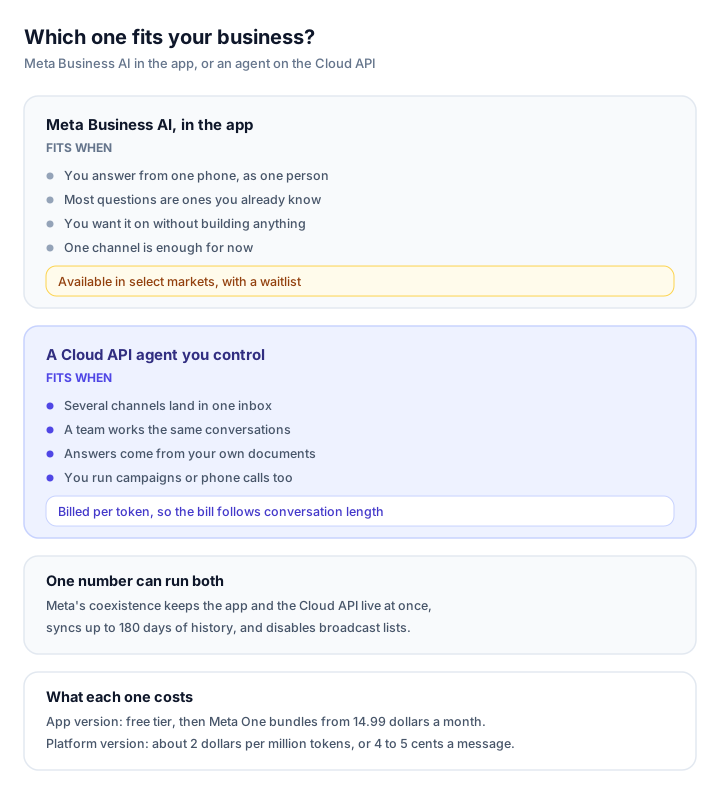
Mostly "answer only" and "one phone" points at the app agent. Two of the first three answers going the other way points at the Cloud API.
Can you run the app agent and a Cloud API agent on the same number?
Yes, though you give something up. Meta supports coexistence: one number can run the WhatsApp Business app and the Cloud API at the same time, with up to 180 days of chat history synced. Broadcast lists are disabled in coexistence, disappearing messages are off, and group chats don't get synced.
What you can't do is run two AI agents on the same number. Meta's platform documentation says a number already running another AI agent isn't eligible for Meta Business Agent. So it's one agent per number, whichever route you take.
Splice AI supports the coexistence option: if your number is already on the WhatsApp Business app, you can connect it and keep using the app alongside the agent. The AI customer support agent page shows how the channels fit together.
What about verification and messaging limits?
You don't need business verification to start on the Cloud API. You need it, or a steady volume of delivered template messages, to get past the default limit of 250 unique recipients a day. From there, limits scale automatically, up to unlimited, once you've used at least half your current limit in a week with good quality.
A display name is mandatory at registration, you can change it a limited number of times, and Meta re-checks it as limits rise. None of that applies to the app agent, which is part of why it's easier to start with and harder to grow.
How Splice AI fits the gap
Splice AI is that third column: an agent you control, on Meta's official Cloud API, for the things the app agent can't do.
- One agent across channels. WhatsApp, Instagram, email, phone calls and website chat behind one knowledge base and one inbox. Fix an answer once and it's fixed everywhere.
- A shared inbox. Any teammate can take over in one click, which pauses the agent. A follow-up that comes due while a teammate is in the conversation is cancelled, not sent.
- Answers from your own documents. Replies are written from the files, pages and answers you upload or crawl. When the answer isn't in the knowledge base the confidence is capped low, so at the default threshold it waits as a draft for a human.
- The window handled for you. Inside the 24-hour window follow-ups are free-form; outside it they switch to your approved templates, with error 131047 falling back to a template instead of silence. See follow-ups and the window guide.
- Campaigns and calls. Template campaigns, email campaigns and outbound phone campaigns in the same product, plus inbound calls on a Twilio, Plivo or Exotel number. See the AI voice agent.
- Your own systems. Custom tools that call your APIs for order status or account lookups.
Frequently asked questions
Is Meta Business AI free?
The app version starts with a free tier that Meta doesn't publish in per-message terms, then Meta One business bundles from around 15 dollars a month. The Cloud API version of Meta Business Agent is billed at 2 dollars per million tokens, roughly 4 to 5 cents for a typical message.
Is Meta Business AI available in every country?
No. Meta says the app version is available to eligible businesses in select markets, with more markets planned, and the language is set by the business phone number. Trust Meta's own pages over the launch coverage.
Do I need a BSP to use the WhatsApp Cloud API?
No. The Cloud API is hosted by Meta and you can integrate with it directly. Partners are useful for embedded signup and for the coexistence option with the WhatsApp Business app.
Can I use Meta Business AI and another AI agent on the same number?
Not both at once. Meta's platform documentation says a number that's already running another AI agent isn't eligible for Meta Business Agent, so plan for one agent per number.
Does turning on Meta Business AI break my away messages?
It can. Meta's help pages say turning the agent on may impede broadcast lists, disappearing messages and greeting or away messages, and that it disconnects linked devices. Check those before enabling it on a busy number.
Are service messages free on WhatsApp now?
Only up to a point. Since 1 October 2026 service messages are billed after the first 1,000 free service messages per business phone number each month, and utility templates sent inside an open window are charged again.
See it on your own conversations
Splice AI answers customers across WhatsApp, Instagram, email, phone and website chat.
See the WhatsApp agent