The short answer
To set up an AI voice agent on Exotel, Plivo or Twilio, connect your carrier account to the agent, point the number at it, pick a voice and place a test call. Twilio and Plivo are wired up by the connect wizard; Exotel needs one extra step in App Bazaar. In Splice AI, inbound calls work on all three carriers, while outbound campaigns run on Twilio and Plivo numbers.
A phone number is the easiest channel to get wrong. The carrier does half the work, the agent does the other half, and when the two disagree the failure usually shows up as silence rather than an error. Here's what each carrier expects, how the number reaches the agent, and the checks that catch a broken setup before a customer does.
What do you need before you start?
- A carrier account with a number. Twilio, Plivo or Exotel. Splice AI can also provision a number where managed provisioning is enabled for your workspace.
- Your carrier credentials, entered once in the connect wizard. Splice AI seals them.
- A knowledge base. The voice agent answers from the same documents and instructions as your other channels, so it helps to have your written channels working first.
- Voice instructions written for speech: short spoken turns, one question at a time, no bullet lists read aloud.
- Credits in your workspace. An outbound campaign will not start without them.
Which carrier should you pick?
Splice AI works with three carriers. Which one you want depends mostly on where you're calling and whether you need outbound at all.
| Carrier | Best for | How the number reaches the agent |
|---|---|---|
| Twilio | US, Gulf and international | The connect wizard sets the number's incoming call webhook for you |
| Plivo | India (+91) and international | The connect wizard attaches its own Plivo application to the number for you |
| Exotel | India, via App Bazaar | You add a Voicebot or Voice Streaming applet with the URL the wizard gives you, then attach the flow to your ExoPhone |
Here's what each one actually does when that wizard runs:
- Twilio's voice webhook docs explain that when a call comes in, Twilio sends an HTTP request to your application and expects TwiML back. Two-way audio runs over Media Streams, which is fixed at mulaw, 8000 Hz, mono, base64.
- Plivo's application guide describes an application as a set of answering, hangup and messaging URLs, which you then select on the number. Audio streaming uses the Stream XML element, and signed webhooks now use the V3 signature.
- Exotel's guide to the Stream and Voicebot applets explains that the Voicebot applet opens a two-way audio stream over a WebSocket. The Stream applet is the one-way version, which is fine for recording and useless for a conversation.
How does each carrier connect to the agent?
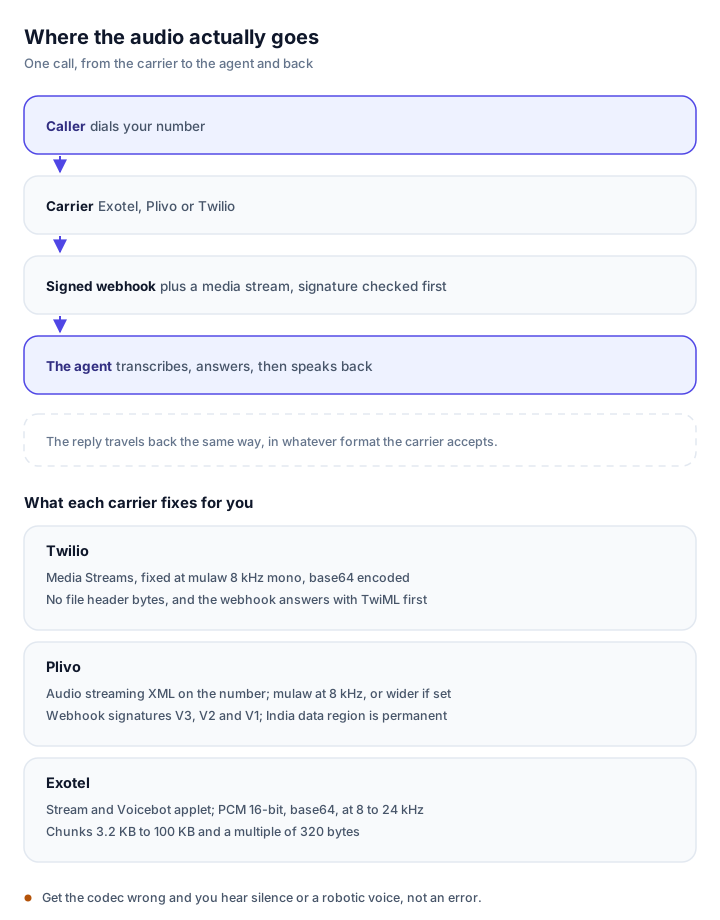
The carrier fixes the audio format and the limits. The agent has to speak back in whatever that carrier accepts.
Twilio
Twilio posts to the webhook on your number and expects XML with a stream instruction in it. The stream is fixed at mulaw 8 kHz mono, so anything the agent sends back has to be in that format with no file header bytes. Debugging silence? Check the codec first. Piping 16 kHz or compressed audio into a Twilio stream gives you noise or nothing at all.
Signature validation uses the public URL plus the sorted POST parameters, so a proxy or load balancer that rewrites the host breaks verification.
Plivo
Plivo calls it an application: an answer URL that returns Plivo XML, and a stream element that carries the audio. Set the content type explicitly rather than trusting the default, because Plivo's own reference and guide disagree about it.
Plivo signs webhooks with the V3 signature, an HMAC over the URL, the sorted parameters and a nonce. Older integrations that verify V2 headers with the V1 algorithm fail with a 403, and the call hangs up before the agent speaks, which usually looks like "ringing, then dead air" in the dashboard.
Indian numbers on Plivo need an India data region organisation, and that choice cannot be changed afterwards. KYC before purchase accepts a GST certificate, a certificate of incorporation or Udyam registration.
Exotel
Exotel has three routes into an AI agent, all under what it now calls AgentStream: the App Bazaar flow with a Voicebot or Stream applet, the Connect API for code owned calls, and ExoML with a start_stream verb. The applet route is the one the Splice AI wizard prepares for you.
Exotel sends raw PCM 16-bit audio, base64 encoded, at 8, 16 or 24 kHz. Two limits bite in practice: the WebSocket session caps at 60 minutes, and audio chunks must fall between 3.2 KB and 100 KB and be a multiple of 320 bytes, or the caller hears gaps.
If the socket closes with code 1006, it's almost always TLS, a firewall, or a handshake slower than about ten seconds.
How do you connect the number in Splice AI?
Open the Voice card under Integrations, or the empty state on Outreach, Phone calls. Both open the same connect wizard.
- Enter your carrier credentials. Splice AI seals them.
- For Twilio or Plivo, pick the number from the list on your account. The wizard points that number at the agent, with no URL to copy.
- For Exotel, copy the URL the wizard shows, add it to a Voicebot or Voice Streaming applet in App Bazaar, then attach that flow to your ExoPhone.
Worth planning around: a Twilio or Plivo number starts sending calls to the agent the moment you connect it. If customers already call that number, either connect it outside business hours or rehearse the setup on a spare number first.
How do you pick a voice?
Under Agent, Voice, the catalogue is grouped by what each voice is good at rather than by vendor:
- Multilingual: one voice that handles many languages. The safest default.
- Natural: the most lifelike English voices, each tied to a specific language.
- Indian languages: voices built for Indian languages and code-mixed Hinglish speech.
Pick the language first. The catalogue then filters to voices that actually speak it, so you can't pair a Hindi script with an English-only voice. Splice AI covers 13 languages, and a set of those voices is grouped for Indian language calls.
Previewing a catalogue voice is free. Typing your own sample text to hear one particular sentence is generated on demand and uses credits.
How do you test the call properly?
Call your own number before you point a customer at it. A test call exercises the whole pipeline: greeting, turn-taking, interruption handling and hangup.
Run these checks in order, because each one fails differently:
- Does it answer at all? If calls ring and nobody picks up, the agent's Voice channel is off, or on Exotel the applet URL is missing.
- Does it answer and hang up immediately? Signature validation is failing, usually stale credentials after a key rotation.
- Can you hear it clearly? Choppy or robotic audio is a codec mismatch, not a voice problem.
- Can you interrupt it? Speak over the agent mid-sentence. It listens while it speaks and should stop.
- Does the transcript appear? The call should show up in the inbox against the lead, with its transcript attached.
The readiness panel shows number connected, credentials sealed and ready to dial, so a missing step is visible before you call.
What happens on a live inbound call?
The agent picks up with the inbound greeting from its Voice instructions. There's no IVR tree to press through, no menu, no hold music.
- The call is transcribed live and answered from the same knowledge base as your other channels.
- On inbound Twilio and Plivo calls, the carrier-verified caller ID counts as a verified identity, so tools marked for verified users can run. Exotel's caller ID is not treated as verified, so those tools stay unavailable on Exotel calls.
- The call becomes a conversation in the inbox, with its transcript, attached to the lead.
The setting that catches people out is the agent's Voice channel, which has to be on. Leave it off and the number is connected while nobody picks up.
During a call the agent can look things up in the knowledge base, call your own APIs through custom tools with a spoken filler so the line does not go silent, email the caller details if a mailbox is connected, and book a callback with a calendar invite if Google Calendar is connected. The voice action mode decides whether those actions happen live or wait in the inbox for approval.
How do you run an outbound campaign?
Outbound campaigns need a Twilio or Plivo number. Exotel's own platform supports outbound AI calls through its connect API, but Splice AI's campaign dialer runs on Twilio and Plivo today, so a workspace with only Exotel cannot start a campaign yet.
- Go to Outreach, Phone calls, and create a campaign.
- Add contacts with name, number, language and the goal of the call. Numbers are validated as you type, with a country-code picker.
- Set a calling window. Campaigns dial only between the start and end times you set, in your own timezone, and they skip any country prefixes you exclude.
- Press Start now. Adding contacts never starts dialling on its own.
- Watch the funnel, volume and Calls table update live.
On outbound calls there is no caller ID to trust, so verified-only tools stay unavailable and the agent asks for what it needs verbally.
Campaigns announce that the call is recorded by default. You have to deliberately turn that off.
What are the India-specific rules?
India has its own compliance layer, and it's about the call being legal rather than about the AI.
- KYC comes first. Plivo and Exotel both require company documents before a number is released, and Exotel quotes roughly two to three business days. Plan for it, since nothing else can be tested until the number exists.
- DND and consent apply. Promotional calls must respect DND/NDNC scrubbing and consent records under TRAI rules, and promotional calling hours are 9 AM to 9 PM IST. Transactional calls are not bound by those hours.
- The number series decides the call type. On Plivo, ordinary landline numbers are for service and transactional calls, 140-series is promotional only and 160-series is reserved for BFSI. Using the wrong series is a fast route to complaints.
- DLT is not a voice requirement. DLT is the SMS sender and template framework. Voice needs KYC, DND handling and the right series, which is why voice setups that "look done" still get blocked.
- Media must terminate in India for the SIP route, which is why some providers insist on an India region. Exotel bills 18% GST, and complaints can carry penalties, so consent records matter commercially as well as legally.
None of this is advice on your own obligations. Recording or transcription may also need a consent notice, depending on your industry.
Troubleshooting
| Symptom | Likely cause |
|---|---|
| Calls ring but nobody answers | The agent's Voice channel is off, or on Exotel the applet URL is missing or wrong. Copy it again from the wizard. |
| Answers, then hangs up immediately | Carrier signature validation failed, usually stale credentials after a key rotation, or a Plivo webhook still verified with a deprecated algorithm. |
| Audio is choppy or robotic | Codec mismatch. Twilio is mulaw 8 kHz only, Plivo and Exotel accept wider formats, so transcode at the edge. |
| Agent sounds like it is reading an email | Voice instructions are empty. Write them for speech. |
| Wrong language or accent | The voice does not speak that language. Pick the language first, then the voice. |
| Outbound campaign will not start | No number connected, no credits, no Twilio or Plivo number, or the campaign is still a draft. |
| Exotel stream drops after an hour | The AgentStream session cap. Split long calls or hand off before the limit. |
Before you dial real customers, run one small campaign to a handful of internal numbers. There's more on the AI voice agent page, and pricing shows how talk time is metered. If you're still choosing a channel strategy, the WhatsApp window guide covers the messaging side of the same customer.
Frequently asked questions
Can I use the phone number I already have?
Yes, as long as it's on a Twilio, Plivo or Exotel account you control. Connect that account and the agent answers on its numbers; the carrier keeps billing you directly for calls.
Which carrier should I pick for India?
Plivo if you need Indian numbers with both inbound and outbound, and Exotel if your numbers already live there and you want inbound AI calls. Twilio is the usual choice for US, Gulf and other international numbers.
Is Exotel inbound only for AI calls?
Not as a carrier. Exotel supports outbound AI calls through its AgentStream connect API. In Splice AI today, outbound campaigns run on Twilio and Plivo numbers, so an Exotel-only workspace cannot start a campaign yet.
Does the voice agent know about WhatsApp conversations?
It does. A call lands in the same inbox and against the same lead as WhatsApp, Instagram, email and website chat, and it answers from the same knowledge base.
How is voice priced?
Voice is metered on talk time, separately from text channels. If you bring your own carrier, the carrier bills you for the line and the minutes, and Splice AI meters only the AI side.
Do I need DLT registration for AI voice calls in India?
No. DLT is the SMS sender and template framework, not a voice rule. Voice calls need KYC on the carrier account, DND and consent handling under TRAI rules, and a number series that matches the type of call.
See it on your own conversations
Splice AI answers customers across WhatsApp, Instagram, email, phone and website chat.
See the voice agent